Daniel Heinsen and I have spent a lot of our time trying to answer one question inside AWS environments, usually in a hurry: starting from the access I have right now, where can I actually end up?
That turns out to be a hard question to answer in AWS. iam:SimulatePrincipalPolicy will evaluate one action, against one principal, in one account, one call at a time. What it can’t tell you is that the low-privilege user you just landed on can update a Lambda function, inherit that function’s execution role, send an SSM command to an EC2 instance, read an external ID out of Parameter Store, and assume into the next account over.
That is the shape of nearly every real AWS path I have worked. No single hop in it is interesting on its own, which is exactly why it tends to survive a policy review. AWSHound is our attempt at making that chain visible.
AWSHound is a read-only collector that turns an AWS account or an entire AWS Organization into a BloodHound Community Edition (BHCE) OpenGraph dataset. Before it draws a single edge, it runs an offline identity and access management (IAM) policy evaluation, such that an edge only exists when a principal’s effective permissions actually resolve to Allow once service control policies (SCPs), resource control policies (RCPs), and permissions boundaries have all had their say. Once the offline policy evaluation creates all nodes and edges, BloodHound can leverage its built-in path finding to map attack pathways from one AWS principal to another.
AWSHound is free, self-hosted, and runs on both BloodHound Community Edition and BloodHound Enterprise. Check it out here:
https://github.com/AWSHound/AWSHound.
The Problem
Attackers and defenders have the same bad time in cloud environments, it is genuinely hard to tell which attack paths are real. AWS is the worst offender I have worked with and it’s not simply because “IAM is complicated.”
The reason is that a permission in AWS is not a property of a principal. It’s the answer to a four-part question:
Can this principal perform this action on this resource in this request context?
Change any one of the four and the answer can flip. Nothing in the console or command-line interface (CLI) holds all four at once. Even for one of those questions, the answer gets assembled out of a stack of policy documents that live in different places and are usually owned by different teams:
- The principal’s policies, which can include:
- Inline Policy
- Managed Policies
- Inherited Policies from Group Membership
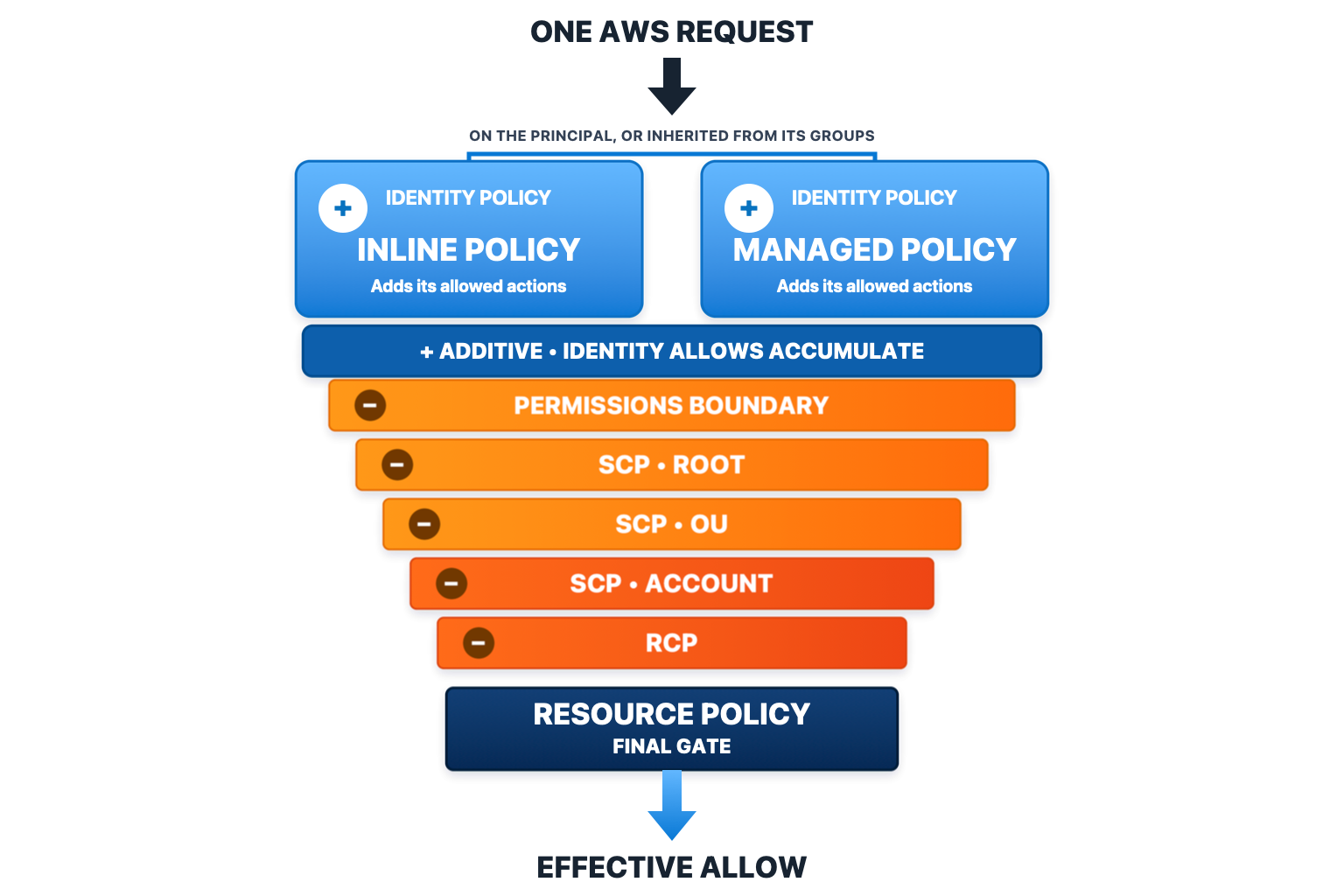
- Permission Boundaries, which never grant anything and only take away
- Service Control Policies consolidated and then intersected across the root management account, organizations OUs, and individual accounts
- Resource-Specific Policies, such as:
- S3 Bucket Policy
- Key Policy
- Function Policy
- Role Trust Policy
- etc.
Policy Evaluation
Here is the part I genuinely did not appreciate until we started writing the AWS policy evaluator. There is no single rule for combining the identity side with the resource side. It changes per service.
| Service | Same-account behavior | Cross-account behavior |
|---|---|---|
| STS | identity AND trust policy | identity AND trust policy |
| S3 | identity OR bucket policy | identity AND bucket policy |
| Lambda | identity OR function policy | identity AND function policy |
EC2, SSM, CloudFormation, and EKS are absent from that table because they are identity governed. They check the identity side and nothing else. What is left is the set of services where a second policy, owned by somebody else, gets a vote. The row worth a footnote is the first one as assuming a role needs both halves even inside a single account.
KMS is absent for a different reason. It does not fit the pattern at all. It runs three layers in order, all of them anchored on the key policy, and the first layer to match wins.
- The key policy itself: If it matches the request directly, that settles it, and a deny beats an allow.
- Account root delegation: If the key policy hands authority to the account root with something broad like
kms:*, an effective IAM allow can grant the action, and an IAM deny blocks it. - A KMS grant: A collected grant can authorize the operations it names, and we keep the grant constraints on the edge so you can see what they were.
Two things follow from that. A key policy we could not collect fails closed rather than open, which is the opposite of how we treat an unknown condition everywhere else. AWSHound’s KMS collection is also limited to same-account only today. Key policies naming a principal from Account A that names a principal within Account B will fail to produce an edge.
So “Can this role read that bucket?” and “Can this role decrypt with that key?” are not the same shape of question. Anything that answers one of them with the other is guessing.
Conditions make it even harder. A policy can make a grant conditional on things that do not exist until a real request is made: the source IP, whether multi-factor authentication (MFA) was used, a tag supplied at request time, the region the call landed in, etc. Offline, none of those are true or false. They are unknown, and any honest static evaluation has to carry three values instead of two and then decide what to do with the third one. We lean toward the attacker on unknowns, which means we keep the allows we cannot disprove and drop the denies we cannot confirm. That is a real decision with real consequences, and it is exactly what makes these candidate paths hypothetical and not fully materialized.
Then there is scale. iam:SimulatePrincipalPolicy exists and it is the right idea, but it answers one action, for one principal, in one account, per call. A mid-size organization has tens of thousands of principals spread across dozens (sometimes hundreds) of accounts, and the question worth asking is a chain three or four hops long that crosses account boundaries partway through. You are not getting there by hand, and you are not getting there one API call at a time.
AWSHound does that composition once, offline, across an entire organization, and hands the result to something already good at finding paths through a very large graph.
Why BloodHound, and Why Free
Two decisions shaped what AWSHound actually is and neither of them is about IAM.
We Did Not Want to Ship Another Graph Viewer
Looking at what is already out there, ApeMan, PMapper, Aurelian, and Cartography all ship their own interface, and every one of those interfaces represents months of somebody’s work that has nothing to do with AWS authorization. We did not have those months, and honestly we did not want to spend them that way.
BHCE had already solved the three hard parts.
- Volume: A mid-size organization produces a graph big enough that storing and querying it is a real engineering problem rather than a detail.
- Pathfinding:
shortestPath()and Cypher work on day one, against our edges, without us writing a traversal engine. - Familiarity: Analysts already know the interface.
That last one is the part I think people undervalue most. The tool that actually gets used is the one already open on somebody’s second monitor. Asking a team to learn a new graph interface before they can get anything out of your collector is a tax, and most of them will quietly decline to pay it.
OpenGraph is what made this possible without forking anything. We register our own node kinds and edge types into CE and they behave like native ones. Everything the BloodHound team ships from here, we inherit for free.
Community as a Core Tenet
AWSHound runs on BHCE, self-hosted, with no license gate and no SaaS tenant to sign up for. That is deliberate and it is the part of this I care most about.
The organizations that most need attack path analysis in AWS are usually the ones that cannot buy it. A team of one or two people running security for a company with forty AWS accounts is exactly the situation where a chain of five boring permissions turns into a bad afternoon, and it is also exactly the situation with no budget line for a cloud security platform.
There is a practical version of the same argument. Nothing leaves your environment. You point it at your own accounts, it writes a JSON file, and you load that file into your own BloodHound instance. For a lot of organizations that is not a preference - it is the only shape of tool that will ever get approved.
How It Works
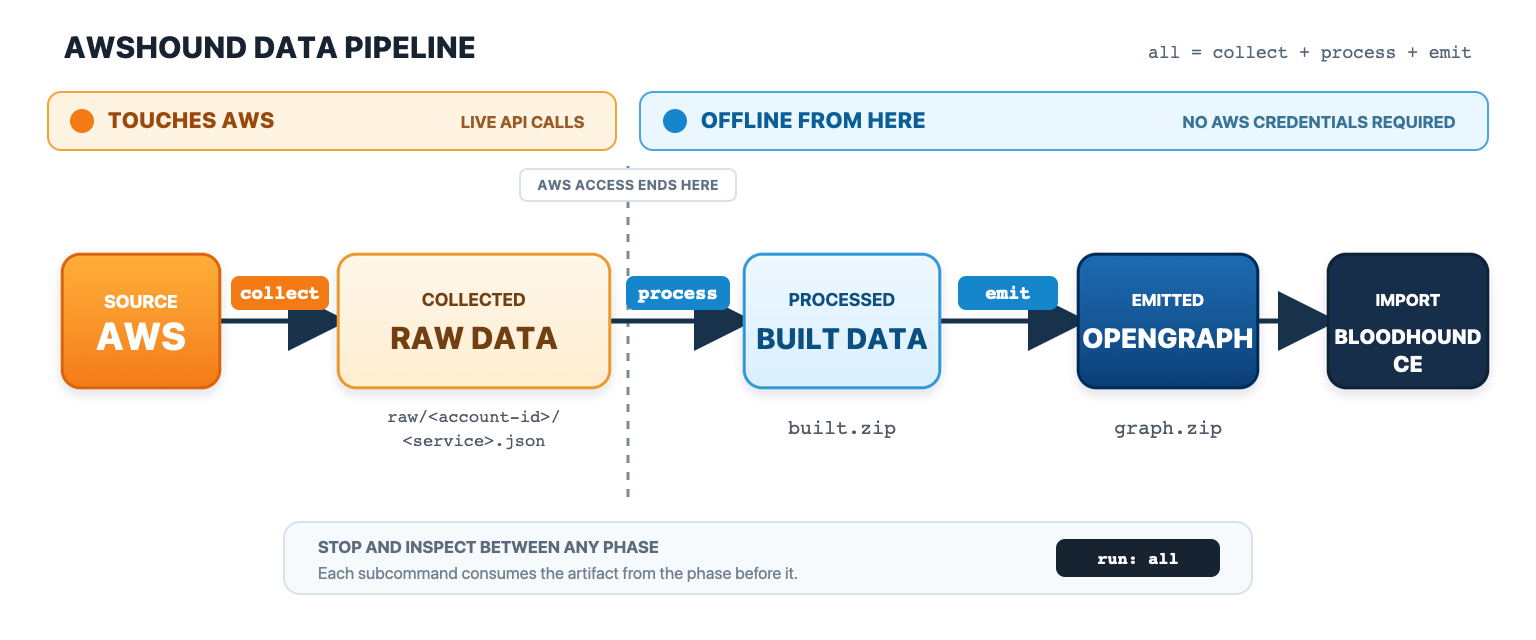
There are three phases each with its own sub-command so you can stop between them and look at what came out. all runs the lot if you just want a graph.
Collect
This is the only phase that talks to AWS, and it only ever reads. List, Get, and Describe, nothing else, and nothing in the target account is modified.
Collection requires one of the following options:
- One or more profiles:
--profile prod, dev, staging, repeatable or comma separated. Credentials resolve through the normal AWS SDK chain, so SSO,credential_process, source profiles, and assumed roles all behave the way they already do for you. - Marked profiles in your AWS config: Set
bloodhound_collect = trueon the sections you want and point--aws-configat the file. This keeps the collection set in the config file instead of in your shell history. - The whole organization:
--org-role OrganizationAccountAccessRole, run from an identity that can enumerate the organization, which in practice means the management account. AWSHound calls STS and Organizations to list the active accounts, collects the base account directly, then assumes that role name into each child account and collects it. A child that fails to bootstrap is logged and skipped rather than killing the run, which matters when one account in eighty is missing the trust.
We have documented all of the required AWS permissions to enable collection. The required Policy Document is written up in AWS Permissions on the wiki.
Process
This is where the actual work happens. The first job is turning policy documents into something you can actually ask a question of. Every statement gets compiled into a per-principal permission set, which means resolving Action, NotAction, Resource, NotResource, and any policy variables down to concrete values.
Service and action wildcards expand against a snapshot of the AWS IAM action catalog that ships compiled into the binary, so s3:* and iam:Get* become real action names with no network call and no cache to warm on first run. A bare Action: "*" stays symbolic instead of being blown out into the entire catalog. Until this step happens there is no question to ask, because “can this principal call s3:GetObject” is not something you can put to the string s3:*.
Now comes the hard part. A principal’s own policies are only the starting set, and every layer above them can take something away.
- Identity policy consolidation: Every matching allow across the principal’s inline policies, its attached managed policies, and anything inherited from its groups combines into one set. Allows are alternatives, not requirements.
- Permissions boundary evaluation: Permissions boundaries are a ceiling and can never add permissions. If the boundary does not permit the action, the grant gets clipped and no edge is drawn.
- Service control policy evaluation: SCP Policies attached at the same level are consolidated, then the root, OU, and account levels are intersected, so an action has to survive every level it passes through.
- Evaluate each layer for Deny actions: A deny from any of those layers lands in a deny set, and within any one layer denies resolve before allows. One unconditional deny beats every allow on that side, no matter how many policies granted it.
Only after all of that does the evaluator ask the question we actually care about. Can this principal perform this action on this resource, and does the resource’s own policy agree.
There is no single operator for that second half. Every service gets its own composition driver and the account the request comes from is an input to that driver rather than a footnote.
- No resource policy: (EC2, SSM, CloudFormation, EKS). The driver only ever considers principals from the resource’s own account. An identity grant is required and there is nothing else to compose.
- S3 and Lambda: The source account flips the operator. Inside one account a bucket policy or a function policy can grant on its own, so either half is enough. From another account, both halves have to agree.
- Role assumption: Both halves, everywhere, even within a single account.
- KMS: Its own three layer evaluation built around the key policy.
An applicable explicit deny on either side wins before any of that composition runs.
Here’s a practical example:
Say there is a deployment role called ci-deploy-role in account 111122223333, and this is attached to it.
{
  "Version": "2012-10-17",
  "Statement": [
    {
      "Sid": "DeployFunctions",
      "Effect": "Allow",
      "Action": [
        "lambda:CreateFunction",
        "lambda:UpdateFunctionCode",
        "iam:PassRole"
      ],
      "Resource": "*"
    }
  ]
}
Read that on its own and it is an escalation. iam:PassRole on * next to lambda:CreateFunction means the role can stand up a function that runs as lambda-admin-role and then execute whatever code it likes as that role. Any tool that reads identity policies and maps relationships will draw that edge, and given what it looked at, it is right to.
Now here is the permissions boundary attached to the same role.
{
  "Version": "2012-10-17",
  "Statement": [
    {
      "Sid": "BoundaryAllowLambdaOnly",
      "Effect": "Allow",
      "Action": [
        "lambda:CreateFunction",
        "lambda:UpdateFunctionCode",
        "logs:CreateLogGroup",
        "logs:PutLogEvents"
      ],
      "Resource": "*"
    }
  ]
}
There is no Deny anywhere in there, and nothing that mentions iam:PassRole at all. That is exactly the point. A boundary is a ceiling, so the effective permission is the intersection of the two documents, and iam:PassRole is not in both. It gets clipped, and ci-deploy-role never gets an AWS_CanPassRoleToService edge.
The permission is on paper. The path is not there. Nothing about the identity policy changed and nobody wrote a deny, which is what makes this so easy to miss by reading. Add iam:PassRole to that boundary and the edge shows up on the next run.
Emit
Emit encodes the built graph into graph.zip, the compressed OpenGraph archive BloodHound expects. This step consolidates duplicate nodes and edges while wiring the right format and property types for BloodHound OpenGraph.
Ingest
Upload graph.zip through the BHCE UI and it takes care of the rest.
The Model
Nodes
A node is anything an attack path can travel through, which means principals and resources both. A path might start at a user, move through a role, land on a Lambda function, pick up the role that function executes as, and finish at a KMS key. Every node is a stop on the attack path.
That is why the resource kinds matter. In a lot of IAM tooling a Lambda function or an SSM parameter is an attribute hanging off a principal - something you look at only after you have already decided which principal is interesting.
Edges are Capabilities
An edge is something you can do, not an administrative relationship. Read the name and you know which API call sits behind it. AWS_CanUpdateLambdaCode is lambda:UpdateFunctionCode. AWS_SSMCanStartSession is ssm:StartSession. Nothing in the graph exists because two objects happened to be mentioned in the same document.
Traversable and Not
There are 156 edge kinds and only 36 of them are traversable. Path finding follows those 36. The other 120 stay in the graph, queryable and visible, but shortestPath() will not walk them.
The split is not structural versus capability, which is what I would have guessed going in. It is closer to asking whether moving along this edge actually gets an attacker anywhere.
AWS_Trusts is the clearest case. A role’s trust policy naming you is a real and useful fact and it is in the graph. It is also not access on its own, because you still need sts:AssumeRole on your side. The edge that means both halves passed is AWS_CanAssumeRole, and that is the one pathfinding follows. AWS_Trusts stays for hunting, so you can ask which roles in the organization trust an external account whether or not anybody can currently use them.
AWS_HasPolicy works the same way. A policy being attached is not the same as its permissions being effective, because a boundary or an SCP may have clipped them on the way through. Attachment is a fact worth keeping. It is not a path.
Some structural edges are traversable, and for a specific reason. AWS_Contains is one. Composite edges usually point at the account node, because “you can become admin of this account” is the honest target, and to continue from there to something inside that account pathfinding has to be able to descend through containment. So AWS_Contains is traversable and AWS_Trusts is not, and both of those are deliberate.
All 156 are listed in the Complete Edge Reference.
Composite Edges
Some permissions only become dangerous in company. Take three of them: iam:CreateRole, iam:AttachRolePolicy, and sts:AssumeRole.
None of those three gets you to account admin by itself, though that is not the same as saying any of them is harmless. Each one is waiting on something the environment may or may not hand it. iam:CreateRole leaves you holding a role with no permissions and nothing trusting it. iam:AttachRolePolicy only pays off if there is already a role you can reach. sts:AssumeRole only pays off if something already trusts you. A graph that draws one edge per permission gives you three separate edges and leaves a person to spot that they combine.
Hold all three and none of those conditions apply, because you supply them yourself. Create the role, attach AdministratorAccess, write a trust policy naming yourself, assume it. That is account admin without needing a single pre-existing privileged role to borrow.
AWSHound folds that into a single traversable edge, AWS_CanCreateAndAssumeAdminRole, pointing at the account. The ingredients do not disappear. They stay on the edge as properties, so you can ask which policy granted each step and why the edge fired at all.
That is the whole idea. The work of noticing which permissions combine into an escalation happens once, in the evaluator, rather than every time somebody reads the graph. An AWSHound path reads like a plan instead of a permissions dump.
What AWSHound Covers
Nine collectors. IAM and Organizations are global, S3 is global with per-bucket regional calls, and the other six run in every selected region. Everything except S3 is on by default.
IAM
The backbone. A single GetAccountAuthorizationDetails call returns every user, group, role, group membership, attached and inline policy, permissions boundary, and trust policy in the account, along with instance profile references. On top of that it picks up SAML and OIDC provider details and the account alias.
Nodes: AWS_User, AWS_Group, AWS_Role, AWS_Policy, AWS_SAMLProvider, AWS_OIDCProvider
Key edges: AWS_CanAssumeRole, AWS_CanPassRoleToService, AWS_CanUpdateSelfPolicy, AWS_CanUpdateOtherPolicy, AWS_CanCreateAccessKey, AWS_CanCreateAndAssumeAdminRole
If you only ever run one collector, run this one.
Not collected: IAM Identity Center permission sets and assignments, Access Advisor data, credential reports, and anything secret. No access key material, no passwords, no MFA seeds.
Organizations
Organization ID and management account, roots and nested OUs, active accounts and their organization paths, and the SCPs and RCPs along with their attachments to roots, OUs, and accounts.
Nodes: AWS_Organization, AWS_Account, AWS_ServiceControlPolicy, AWS_ResourceControlPolicy
Key edges: AWS_Contains, AWS_HasPolicy
The SCPs and RCPs matter less as edges than as the ceilings the evaluator applies. Skip this collector and you still get a graph, but those layers are simply not there to clip anything.
It needs visibility normally available only to the management account, and during an organization sweep it runs once from the base account rather than in every child.
S3
The one collector that is off by default, because it is usually the most expensive. Bucket list, region, bucket policy, ACL, public access block, ownership controls, tags, and up to 1,000 objects per bucket.
Nodes: AWS_S3Bucket, AWS_S3Object
Key edges: AWS_S3BucketAll, AWS_S3BucketRead, AWS_S3BucketWrite, AWS_CanPutBucketPolicy
The bucket policy, ACL, public access block, and ownership controls are not trivial. They are exactly the inputs to the S3 composition rules from earlier, which is why an S3 access question gets answered rather than guessed at.
Worth knowing that the 1,000 object cap is hard-coded so the graph is not an object inventory for a large bucket. --s3-filter narrows what you ingest, but it applies while processing a raw directory rather than reducing live API calls.
KMS
Keys and metadata, the default key policy, aliases, grants, resource tags, and rotation state where it applies.
Nodes: AWS_KMSKey
Key edges: AWS_CanDecryptKMSKey, AWS_CanModifyKMSKeyPolicy, AWS_CanSelfGrantKMSOps, AWS_CanCreateKMSGrant
None of the KMS edges are traversable, which is deliberate. Decrypting with a key gets you data, not a new position in the graph, so pathfinding treats a key as a destination rather than a waypoint.
Only the default key policy is requested, and as covered earlier, a key policy we could not collect fails closed rather than open.
SSM
Parameter Store metadata and the SSM managed instance inventory. Parameter names, ARNs, types, tiers, KMS key IDs and tags, plus which EC2 instances SSM can actually reach.
Nodes: AWS_SSMParameter
Key edges: AWS_SSMCanSendCommand, AWS_SSMCanStartSession, AWS_CanGetParameter, AWS_CanPutParameter
Those first two are how a principal gets code execution on an instance without going anywhere near SSH.
Parameter values are never requested. AWSHound will tell you who can read a SecureString, not what is inside it.
EC2
Instances and their state, instance type, AMI, VPC and subnet, IPs, block device volume IDs, security group identifiers, tags, and the instance profile ARN.
Nodes: AWS_EC2Instance
Key edges: AWS_RunsAs, AWS_CanModifyEC2InstanceAttribute, AWS_EC2CanVolumeSwap, AWS_CanGetPasswordData
The instance profile is the whole point. AWS_EC2Instance plus AWS_RunsAs is how a path moves from an instance to the role it carries, which is the classic IMDS pivot.
Networking is not modeled. No security group rules, route tables, ENIs, or user data.
Lambda
Functions and their configuration, execution role, KMS key, layers, the function resource policy, function URL configuration, and tags.
Nodes: AWS_LambdaFunction
Key edges: AWS_CanUpdateLambdaCode, AWS_CanUpdateLambdaConfiguration, AWS_CanInvokeLambdaFunction, AWS_RunsAs
AWS_CanUpdateLambdaCode followed by AWS_RunsAs is one of the shortest routes in AWS from “I can deploy” to “I am that role.”
Function code and environment variable contents are not collected.
CloudFormation
Stacks with status, execution role, capabilities, and tags, stack resource summaries, and StackSets with their permission model and administration and execution roles.
Nodes: AWS_CloudFormationStack, AWS_CloudFormationStackSet
Key edges: AWS_CanUpdateCloudFormationStack, AWS_CanExecuteCloudFormationChangeSet, AWS_CanUpdateCloudFormationStackSet, AWS_RunsAs
A stack that deploys using a privileged service role means anybody who can update that stack effectively holds it.
Templates, parameters, outputs, and change sets are not collected.
EKS
Clusters with service role, OIDC issuer, and Kubernetes version, managed node groups with their node role, access entries and associated access policies, and Pod Identity associations.
Nodes: AWS_EKSCluster, AWS_EKSNodeGroup
Key edges: AWS_CanCreateEKSPodIdentityAssociation, AWS_CanCreateAndAssociateEKSAccessEntry, AWS_CanAssumeRoleViaIRSA, AWS_CanAssumeRoleViaPodIdentity
Those last two are what tie Kubernetes identity back to IAM roles.
AWSHound never connects to the Kubernetes API. No RBAC, no service accounts as nodes, no workloads, no secrets. IRSA is inferred from the cluster issuer, role trust, and condition data rather than by enumerating what is actually running in the cluster.
Two attack paths: account compromise and organization compromise
Rather than sanitize something from real work, I built a demo organization and pointed AWSHound at it. There are intentional attack paths. The first stays bounded to a single account and ends at account administrator. The second starts with an AWS user in the dev account and walks through dev, staging, production, to the Organizations management account.
Both are contrived in the sense that I put them there, but neither is unrealistic. I have run into every hop in each attack path at one point or another.
Same-Account Compromise
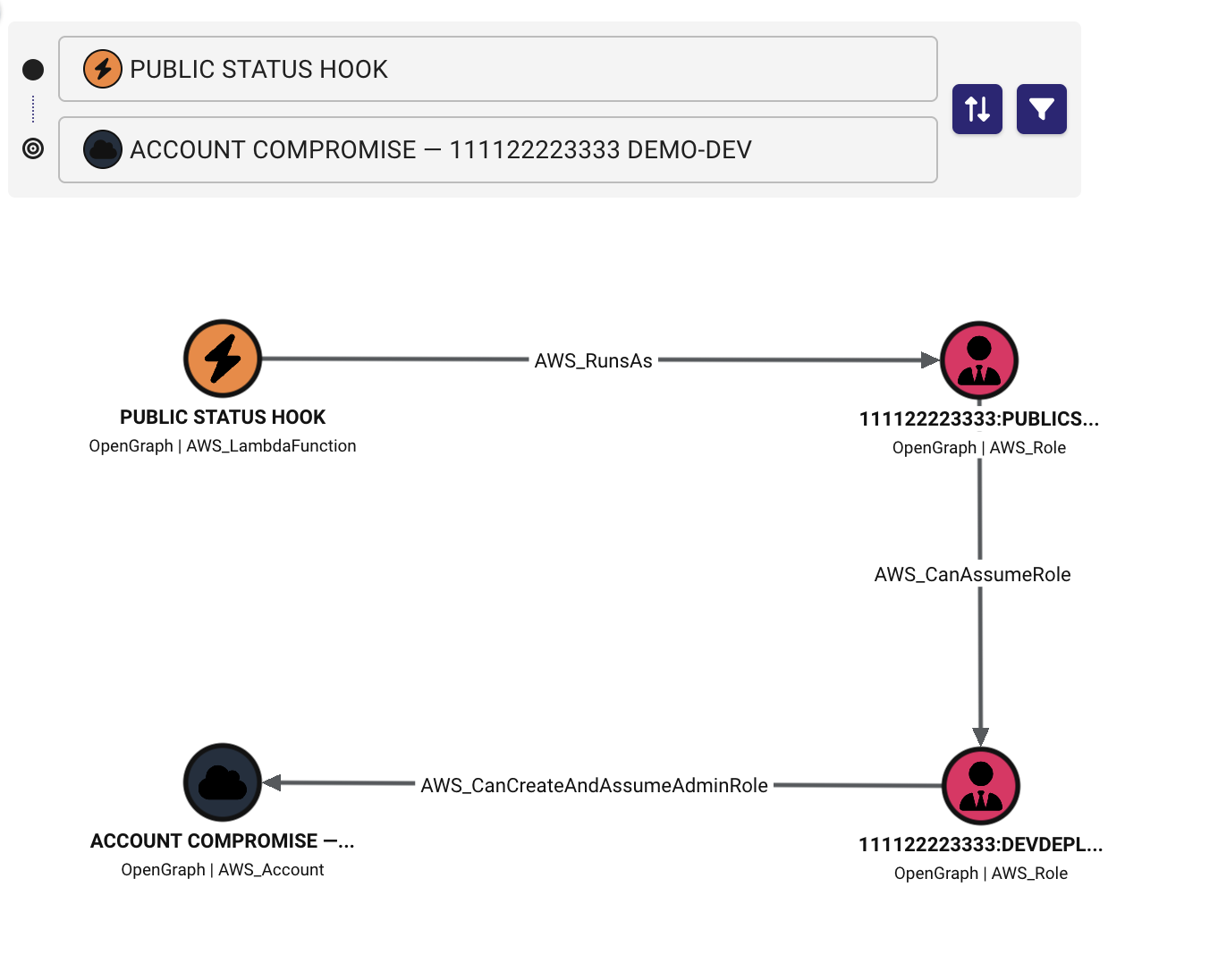
The entry point is an internet-accessible Lambda function. Code execution inside it exposes the credentials of PublicStatusLambdaRole, which is what the AWS_RunsAs edge represents. That role can call sts:AssumeRole into DevDeploymentRole, and from there AWS_CanCreateAndAssumeAdminRole says the role can create a self-trusting role, attach or write an administrator policy, and assume it.
The edge points at the AWS_Account node rather than at another role. The composite is account takeover, so the account is the honest destination.
The edge properties are worth opening. allow_sources names the policy that authorized the sts:AssumeRole, and the composite carries the create, attach, and assume methods behind the takeover. That is where to look when you want to know why an edge fired.
Cross-Account Path to Organization Compromise
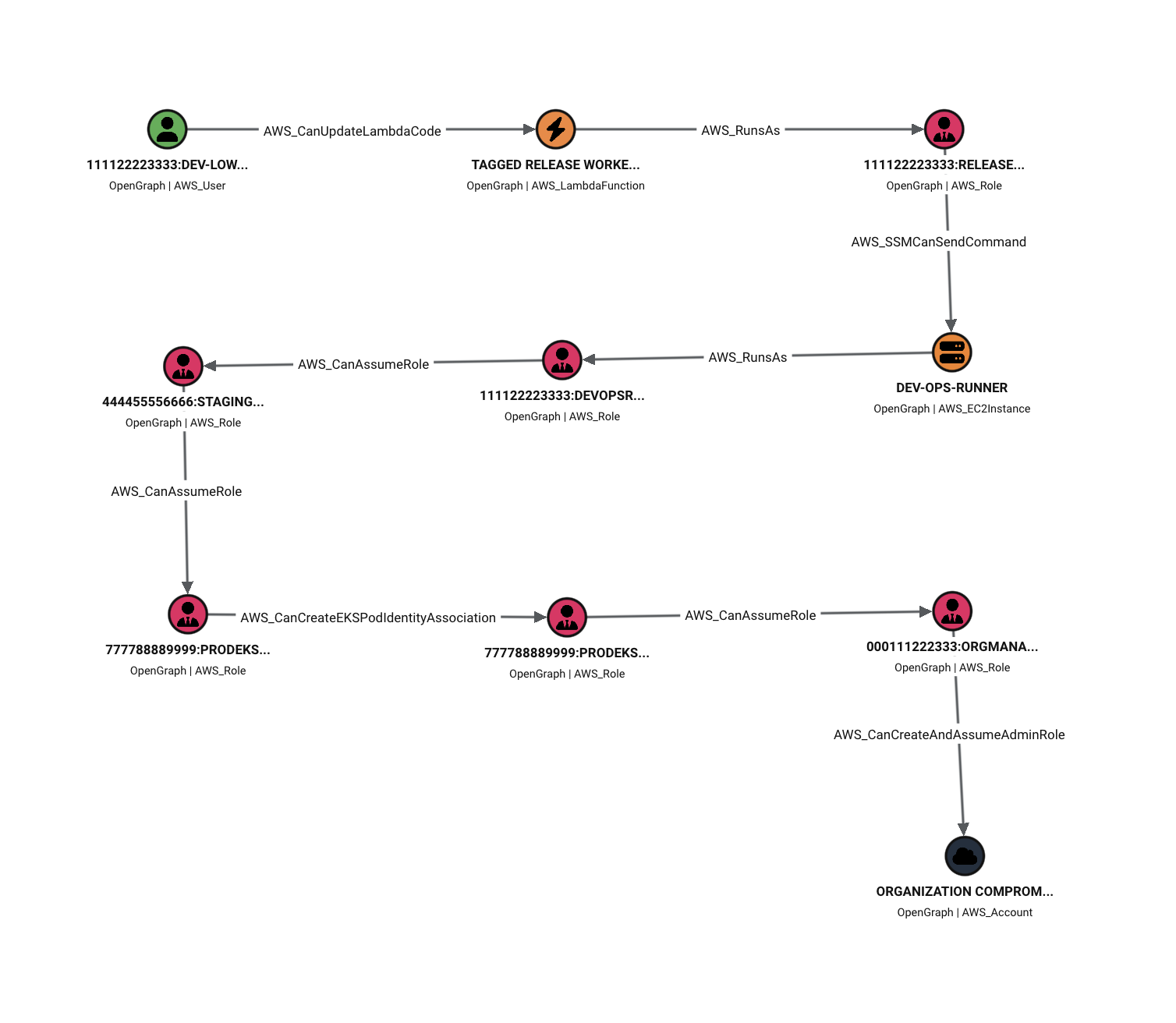
The starting user has one inline policy. It allows lambda:UpdateFunctionCode, but only against a function tagged Environment=dev, and that condition stays on the AWS_CanUpdateLambdaCode edge rather than being flattened away. Replacing the code in Tagged Release Worker gives execution as ReleaseWorkerRole, which can ssm:SendCommand at the managed EC2 runner. Execution on the runner exposes DevOpsRunnerRole through IMDS.
The first cross-account hop carries conditions. DevOpsRunnerRole can read the upstream SecureString holding the external ID, and the edge into StagingAutomationRole carries the sts:ExternalId requirement and the Project=payments request tag in trust_policy_conditions. Staging into production requires a principal tag as well.
In production, ProdEKSDeployerRole can create a Pod Identity association to ProdEKSWorkloadAdmin. That role branches two ways: it can read the production SecureString, and it can decrypt with the KMS key, but only through Parameter Store and only with the matching encryption context.
Both of those edges, AWS_CanGetParameter and AWS_CanDecryptKMSKey, are non-traversable. They record impact without claiming that reading a secret hands you a new identity.
The path continues past production. ProdEKSWorkloadAdmin can assume OrgManagementBootstrapRole in the management account, again conditional on a principal tag, and the bootstrap role can create and assume an administrator role once it is there. The terminal node is labeled ORGANIZATION COMPROMISE — Management Account, with the AWS_Organization node attached for context.
Each hop is individually defensible. The tag condition on the Lambda edge, the external ID on the staging trust, the principal tag into production, every one of those looks like reasonable scoping on its own. What the graph adds is the ordering, and the conditions on each edge so you can see which locks are in the way before touching the environment.
What it looks like at scale
awshound all run against the 500 account dataset, from ingest through to the emitted graph.Numbers from an actual run:
- Over 500 accounts in one AWS Organization
- Produced ~160,000 nodes
- Produced ~10.5 million edges
- In ~15 minutes of processing time
That split makes sense once you look at what each phase is actually doing. A node is mostly an ARN and a handful of properties, so building one costs almost nothing. Edges are where the evaluator runs, composing identity policies against boundaries, SCPs, RCPs, and whichever resource policy applies, for every candidate action against every candidate resource. That run had 53,466 edge build units in it, and each edge is an authorization question that has to be answered before it’s emitted to the graph.
Installing into BloodHound
graph.zip in BloodHound CE.From the UI, signed in as an administrator:
- Administration → Early Access Features, and enable OpenGraph Extension Management if it is present and switched off.
- Administration → OpenGraph Management, and upload
schema/schema.json. - Check the extension appears as AWS (AWSHound), namespace
AWS, at the version you expect. - Quick Upload, and upload
graph.zip. - File Ingest, and wait for ingest and analysis to finish.
Installing or updating the extension needs administrator rights. Uploading the graph only needs collection ingest permission. There is a REST API path for all of this too, documented in BloodHound Setup and Import, which is the better option if you are going to do this on a schedule.
Prior Works
None of this is a new idea. People have been building AWS attack path tooling for years, and I read or used most of it while we were working out what AWSHound should be. If you are picking a tool, one of these may suit you better than AWSHound does, so here is an honest read on each.
ApeMan (hotnops/apeman):
Apeman is an IAM attack path graph in Neo4j with its own web interface built around ingesting get-account-authorization-details one account at a time. It is the most direct ancestor of this work and worth saying up front: Daniel Heinsen, who wrote it, is a co-author of AWSHound.
IAMhounddog (VirtueSecurity/IAMhounddog):
IAMhounddog finds privileged principals and second-order escalation opportunities in a single account, and emits an output.json that imports straight into BloodHound CE off SecurityAudit or ReadOnlyAccess. It is the closest comparison here and the one to look at next if AWSHound does not fit you, though it maps relationships rather than evaluating policy. This means there is no SCP, RCP, or boundary intersection and no conditions carried on the edge.
PMapper (nccgroup/PMapper):
PMapper models users and roles as a directed graph and runs a local authorization simulator with AWS Organizations metadata, SCP-aware evaluation, and cross-account edges, rendering to SVG, PNG, DOT, or GraphML. We have not validated how deep that evaluation actually goes so read this as a description rather than a comparison, but the difference we are sure of is scope: PMapper is a principal-to-principal path engine with its own visualization, while AWSHound builds a broader resource graph for BloodHound CE.
Aurelian (praetorian-inc/aurelian):
Aurelian is Praetorian’s multi cloud recon framework written in Go, covering secrets, public exposure, and privilege escalation across AWS, Azure, and GCP, using Neo4j for interactive exploration. For our purposes it is breadth over depth, since IAM is one module among many across three clouds and the graph is its own Neo4j schema rather than BloodHound OpenGraph.
Cartography (cartography-cncf/cartography)
Cartography is a CNCF project that pulls assets and their relationships from 30+ platforms into Neo4j, and it is excellent at cross platform questions that no AWS only tool can answer. It is a different job rather than a worse attempt at ours, because it records that a relationship exists without evaluating whether the permissions actually authorize the action.
CloudMapper (duo-labs/cloudmapper):
CloudMapper is Duo Labs’ AWS auditing toolkit, worth citing for its security audits and find_admins, though the network visualization it is best known for is no longer maintained per the project’s own README. You get findings and reports rather than a graph you can walk from a foothold to a target.
BloodHound OpenGraph (specterops/bloodhound)
BloodHound itself, and the SharpHound and AzureHound collectors that established the pattern AWSHound follows. We did not invent the shape of any of this. We pointed it at AWS.
Future Roadmap and Contributing
More collectors are the obvious next thing. Bedrock, ECR, ECS, and CodeBuild are the priorities, because every one of them is somewhere a role gets attached to something that runs code, which is exactly the shape of hop that turns into a path.
After that, performance. That 13-minute edge build is the number I would most like to bring down and it is where nearly all of the runtime lives.
If you run this and it breaks, or it draws a path you do not believe, please open an issue. The second kind is more useful than the first. An edge that should not be there tells us something about the evaluator that a crash never will, and the condition properties on the edge are usually enough for us to work out why it fired.
And if you point it at an organization much larger than 500 accounts, I would genuinely like to hear how that went.
Acknowledgements
None of this happens without a few people.
Daniel Heinsen (hotnops) is a co-developer of AWSHound and wrote ApeMan before it. A lot of the ideas here started there.
The entire BloodHound team, for OpenGraph, and for building the thing that meant we never had to write a graph interface of our own.
The SpecterOps research team, for help with the schema design, which is a good deal harder to get right than it looks from the outside.
Thanks for reading. Go point it at something.